
Bring Your Bank Accounts Together: All Your Accounts in One App
When you want to bring your bank accounts together, you usually do not mean turning three accounts into one. You want to see all your balances and transactions in one place. There are two ways to do that: connect your accounts automatically to a finance app through a regulated PSD2 interface where supported, or maintain them manually in the app. Your accounts, IBANs and banks stay as they are. Here, we explain how the connection works technically and legally, how often it updates, how to revoke access, and how couples and families can build a shared overview. The banking rules discussed below relate to the European PSD2 framework and the German sources cited; availability and rules elsewhere may differ. KRONO is iPhone-only, with optional bank connections available only in Germany through Salt Edge. In other countries, use manual entry or CSV imports.
At a glance
- Bringing accounts together means displaying them together. Your accounts stay with their banks; the app simply combines the data.
- Automatic connections are regulated by law. Under the PSD2 framework, banks must provide third-party services with a documented interface, and you must explicitly consent to access.
- You reconfirm access regularly, with the cited bank guidance describing intervals of 90 or 180 days depending on the bank. You can revoke access at any time.
- For couples and families, a shared view of all accounts can be useful, whether you use a joint account or keep your accounts separate.
- In KRONO, you can get a combined overview with manual entry for free, forever, for up to 3 accounts, 2 loans and 1 monthly budget. KRONO Pro adds optional automatic bank imports in Germany only.
Contents
- What bringing bank accounts together actually means
- How automatic bank connections work
- What data a finance app with bank access can see
- How often connected accounts update
- Security: you decide who has access
- A shared overview for couples and families
- Bring accounts together without bank access
- Our view: bringing accounts together is the starting point, not the goal
- Bring all your accounts together in KRONO
- Frequently asked questions
- Sources
What bringing bank accounts together actually means
Many people have accounts with several banks: an account for their salary at their main bank, an easy-access savings account with an online bank, plus a credit card and perhaps an investment account. This is more the rule than the exception. Around 70 percent of people in Germany have accounts with more than one bank, using two institutions on average. Only some currently manage those accounts together: according to the same analysis, 32 percent of customers with multiple banks do so.
Accounts at different banks cannot technically be merged into a single account. Each has its own IBAN, contracts and terms. Searches for “bringing accounts together” therefore reflect three different goals:
| What you want | How to do it | What changes |
|---|---|---|
| Have fewer accounts | Close one account and move standing orders, direct debits and salary payments to another | You genuinely have fewer accounts afterward |
| Pay for things jointly with your partner | Open a joint account that you both pay into | You add another account |
| See everything at a glance | Connect accounts to a finance app or record them there | Nothing changes about your accounts—only your overview |
This article focuses on the third option. It has a major advantage: you do not need to close anything, move payments or open a new account. You keep the setup that works for you, such as a three-account system with separate salary, spending and savings accounts, while still seeing everything together. People who deliberately spread their money across several accounts often need that overall view most urgently. Otherwise, it is easy to lose track of how much is available in total.
How automatic bank connections work
Automatic connections are based on the European Payment Services Directive, PSD2. It requires banks to give third-party providers regulated access to account data. Germany’s Federal Office for Information Security explains that banks must provide an openly documented interface on the internet through which third-party services can access data on a customer’s behalf. These services identify themselves using qualified certificates under the eIDAS Regulation.
In practice, connecting an account in a finance app usually follows a similar process:
- Select your bank. Search for your bank’s name in the app or enter your IBAN.
- Sign in to online banking. You are directed to a sign-in page and log in with your online banking credentials.
- Authorize access. Confirm using a second factor, for example a TAN authentication app, pushTAN or your fingerprint.
- Select your accounts. Choose which accounts at that bank you want to add to the app.
- Initial import. The app retrieves balances and transactions and assigns them to your accounts.
- Repeat for each additional bank. Your overview is complete only once all your banks have been added.
The authorization in step 3 is not just a formality. The cited Deutsche Bundesbank guidance describes authorization on first access and subsequently at least every 90 days using strong customer authentication. Other bank guidance cited below describes 180-day intervals; follow your bank’s current requirements rather than treating 90 days as a universal deadline. Strong authentication generally means two of three factors: something you possess, such as a smartphone; something you know, such as a PIN; or a biometric characteristic.
In KRONO, optional bank connections are available only in Germany and run through Salt Edge. Our page on Open Banking connections in Germany shows what the connection looks like in the app. Outside Germany, KRONO supports manual entry and CSV imports instead. If you would like a deeper understanding of the principle, our article Open Banking explained simply covers the basics.
What data a finance app with bank access can see
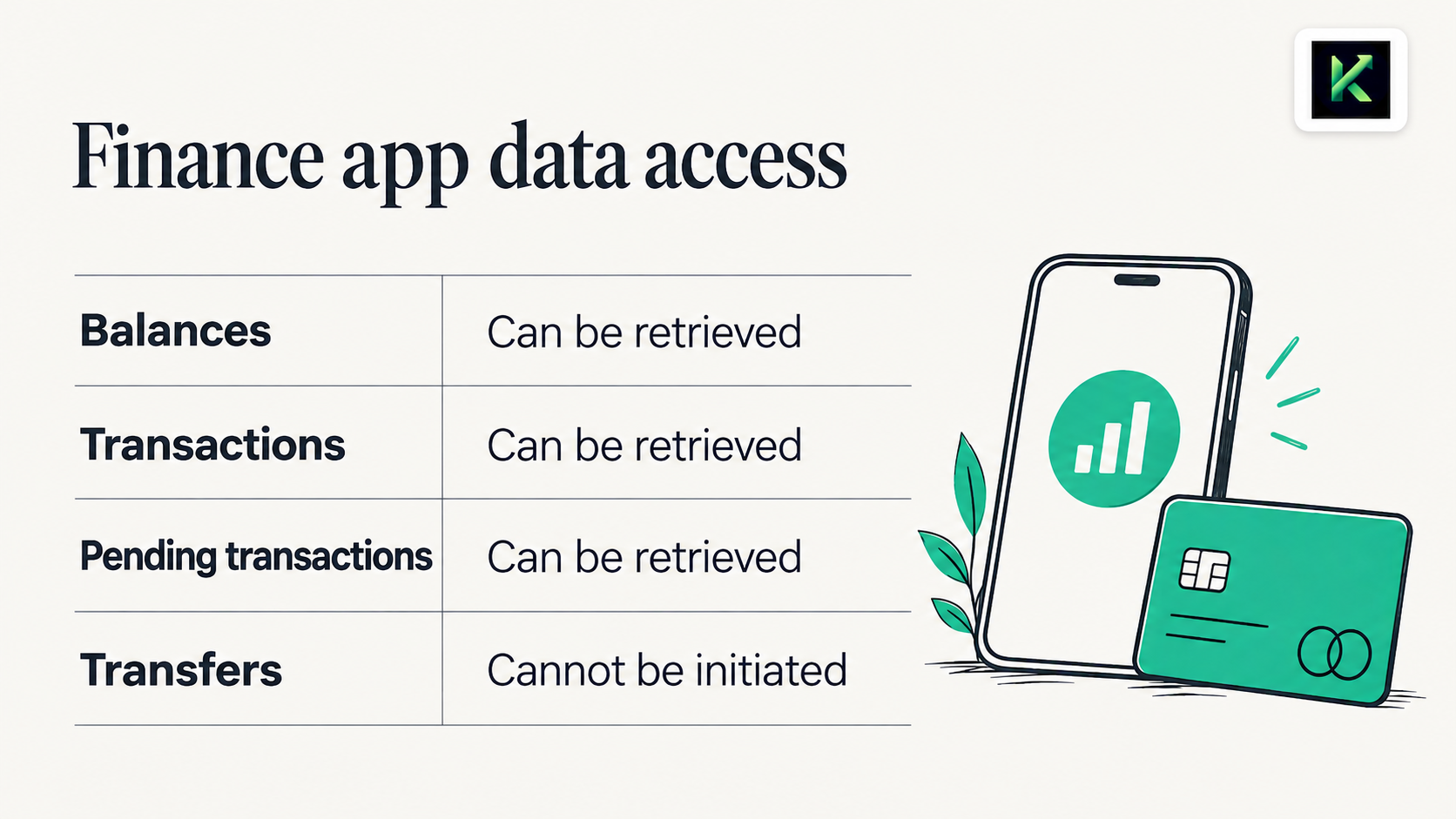
An app that only reads your account data operates as what is known as an account information service. According to the Bundesbank, such a service may retrieve balances, transactions and pending transactions, provided the account is accessible through online banking. That is its limit: an account information service does not initiate transfers. Payment initiation is a separate type of service requiring its own authorization. Heise explains that third-party services in Germany generally must be authorized as payment initiation services or registered as account information services.
It matters which accounts fall under these rules. GLS Bank points out that PSD2 covers access to payment accounts, such as current accounts. Which additional products your bank makes available through its interface depends on the institution. For a truly complete overview, manually add anything that does not come through automatically: an installment loan, a mortgage, an investment account or a property. In KRONO, you can create these accounts and loans manually, and they feed into your net worth and cash flow forecast just like connected accounts.
What happens to the data after retrieval is governed by data protection requirements and the provider’s privacy policy, rather than PSD2 alone. A complete transaction history reveals a great deal about your income and habits, so it is worth checking where an app stores your data. KRONO stores your financial data locally on your iPhone, without its own cloud servers. Optional household sharing uses your private iCloud. Our guide to financial planning without the cloud explains how this works.
How often connected accounts update
Automatically syncing bank accounts does not mean that every card payment appears within seconds. Data is retrieved at intervals. The Sparda banks describe a framework in which an account information service may retrieve data up to four times a day without further action by the customer. It receives the same data you see in online banking. Actively opening the app may trigger an additional retrieval.
Authorization does not last indefinitely. Depending on the bank, you may be asked to reconfirm after 90 or 180 days; the Sparda banks also describe these intervals for their regional institutions. That explains why an app occasionally asks you to sign in to your bank again. It is not necessarily an error, but part of the intended security process. Your bank’s current authentication and consent requirements determine the actual timing.
When syncing stops working
If new transactions are not appearing, one of these causes is often responsible:
- Your authorization needs renewal. Sign in to your bank again through the app and confirm with your second factor.
- You changed your credentials or authentication method. A new PIN, a new smartphone or a different TAN app can interrupt an existing connection. Reconnect using the updated details.
- You added a new account. A newly opened subaccount may not appear until you select it during your next sign-in.
- Your bank is experiencing an outage. Interfaces can occasionally be temporarily unavailable. Wait a few hours and try again.
As a general rule, update or renew the existing connection before deleting the bank entirely and adding it again. This helps preserve your categorization.
Security: you decide who has access
The most important rule comes first: nothing happens without your explicit consent. The Consumer Advice Centre of Lower Saxony emphasizes that no third-party provider may access account data without explicit consent. It also sees account information services as particularly useful for people with accounts at several banks.
Additional layers of protection include:
- Registration: Third-party services must be registered and meet strict security requirements. Volksbanken Raiffeisenbanken also explains that banks log access and account holders can revoke permission at any time.
- Strong authentication: Where strong customer authentication is required, authorization uses two factors, just as in regular online banking.
- Read-only access: A service that provides account information only cannot move money.
- Periodic renewal: The cited bank guidance describes renewed authentication after 90 or 180 days. Access may be interrupted if you do not renew it; the precise requirements depend on your bank.
For your own security, enter your online banking PIN only on the verified sign-in page used during the connection process—never in an email or text message, or during a phone call. Also protect the app on your iPhone with Face ID or a passcode. If you receive an unusual authorization request that you did not initiate, do not approve it. Call your bank’s customer service number instead.
Revoking access
If you want to end a connection, there are two routes. You can disconnect or delete the bank connection in the app. You can also check with your bank: many institutions show which third-party services have access in online banking and let you revoke permission there. Access may also stop when the applicable consent or authentication period expires, but if you want to end it, revoke permission explicitly rather than relying on expiry.
A shared overview for couples and families
Couples organize their money in very different ways: everything in a joint account, everything separate, or a mixture of both. A common arrangement is the mixed approach—for example, two salary accounts plus a shared household account for rent, electricity and groceries. This is exactly where things can become confusing: each person sees only their own banking app, and neither app answers the question, “How much do we actually have?”
The solution does not have to be merging all your accounts. Simply seeing them together can be enough. In KRONO, you can optionally share financial data through private iCloud household sharing. The data does not pass through KRONO servers; it stays within your own iCloud environment. That lets both of you see the same accounts, budget and forecast.
A shared overview is especially valuable for major decisions. If you want to buy an apartment or a house, the bank will examine your finances closely, comparing income and expenses and assessing what repayments you can afford. It is worth understanding in advance how a bank’s household affordability calculation works. If you already have a combined view of your accounts, you know your actual monthly fixed costs before that conversation. In KRONO, you can also plan a property purchase as a life event and see how the loan repayment affects your cash flow over the next 24 months. These are planning projections, not guaranteed outcomes.
In practice, this sequence works well for couples:
- Take inventory: Each person lists all their accounts, cards, loans and savings plans.
- Decide what to share: Not every personal account needs to appear in the shared view. Make a deliberate choice together.
- Connect or record accounts: Connect supported payment accounts automatically where available—in KRONO, only in Germany—or use manual entry and CSV imports. Add loans and savings plans manually.
- Set up a shared budget: Define fixed costs, household spending and savings goals together.
- Review regularly: A fixed monthly check-in, perhaps using the monthly PDF report, turns numbers into a conversation.
Bring accounts together without bank access
Not everyone wants to give an app access to their bank accounts, and no one has to. A combined overview also works manually: create your accounts with their current balances and enter income and expenses yourself. That may sound like more work, but it has an effect many people underestimate: deliberately recording each expense can help you understand your spending habits much better.
That is exactly what KRONO Free is designed for: free forever, without a subscription or bank access, bringing your budget, accounts, debt, net worth and cash flow into one place. Free includes up to 3 accounts, 2 loans and 1 monthly budget. Our guide to a budget app without bank access explains how to make good use of one. If you later want to automate imports in Germany, you can upgrade to Pro and connect supported banks without losing your existing data. In other countries, manual entry and CSV imports remain the available options.
Our view: bringing accounts together is the starting point, not the goal
We see every day why people want to bring their accounts together: they feel they have lost track. Three banking apps, a credit card, a loan—and at the end of the month, they still do not know whether the money was enough. A list of balances only goes halfway toward resolving that feeling.
That is why we did not build KRONO simply to display accounts. Once all your accounts are in one place, the real work begins: what is left after fixed costs? How is your net worth developing once you include debt? What might your balance look like in 18 months if you take parental leave or your loan repayment increases? These illustrative planning scenarios are the kinds of questions we address with a cash flow forecast covering up to 24 months and our financial score, which brings together seven aspects of your financial situation. Forecasts are estimates, not promises.
Where your data lives matters just as much to us. Bringing all your accounts together means putting your entire financial life into one app. That is why KRONO stores data locally on your iPhone, while couples can choose to share through their private iCloud rather than our servers. Our bank connection is an optional time-saver available in Germany, not a requirement. You can get the overview without it.
Thomas
Bring all your accounts together in KRONO
KRONO brings current accounts, savings accounts, loans, debts and assets into one overview on your iPhone. It is available only for iPhone. KRONO Free is free forever and covers a manually maintained overview for up to 3 accounts, 2 loans and 1 monthly budget. In Germany, KRONO Pro costs €6.99 per month or €69.99 per year; elsewhere, prices vary by region. Pro unlocks features including unlimited accounts and loans and advanced planning tools such as Monte Carlo simulation. Optional automatic bank connections through Salt Edge are available only in Germany; users in other countries use manual entry or CSV imports.

You can find full details of both options on our KRONO Free and Pro pricing page.
Frequently asked questions
Do my accounts become one account when I bring them together?
No. Your accounts remain at their banks with their existing IBANs. The finance app simply reads balances and transactions and displays them together, or shows the data you enter manually. If you actually want fewer accounts, you need to close an account and move its payments to another one.
Can you have accounts with several banks?
Yes. It is completely normal and, according to the cited analysis, applies to the majority in Germany: around 70 percent of people there have accounts with more than one bank. Many do this deliberately, for example by keeping separate salary, spending and savings accounts. A finance app helps you keep track of the total.
How often do I need to reconfirm my bank connection?
That depends on your bank. The cited guidance describes intervals of 90 or 180 days, after which you sign in again through the app and confirm with your second factor. Follow your bank’s current requirements. This periodic authentication is a regulatory security measure, not necessarily a technical fault.
Can a finance app with bank access transfer money?
An account information service can only read balances, transactions and pending transactions. Initiating transfers is a separate type of service requiring its own authorization. KRONO uses its optional bank connection, available only in Germany through Salt Edge, to import and analyze your transactions.
Sources
- Lucerne University of Applied Sciences and Arts: Multibanking for retail banks
- BSI: Strong customer authentication and account interfaces
- Deutsche Bundesbank: Frequently asked questions about third-party service providers
- heise online: New and old banking APIs—an overview
- GLS Bank: Consent to access account data under PSD2
- Sparda banks: Questions and answers about PSD2
- Consumer Advice Centre of Lower Saxony: PSD2 and third-party providers
- Volksbanken Raiffeisenbanken: PSD2 explained